
Cybersecurity researchers are warning users about a wave of malicious Google Chrome extensions that look harmless on the surface, but are secretly built to hijack affiliate links, scrape browser data, and steal OpenAI ChatGPT authentication tokens.
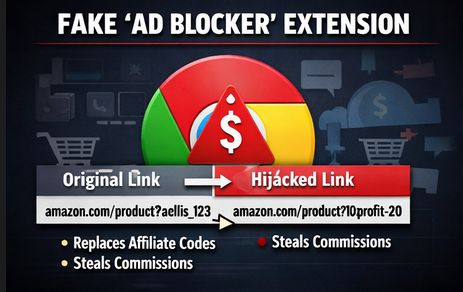
The most notable example is an extension named “Amazon Ads Blocker” (Chrome Web Store ID: pnpchphmplpdimbllknjoiopmfphellj). It presents itself as a tool that removes sponsored content on Amazon, allowing users to shop without ads. However, investigators found its real purpose goes far beyond ad blocking.
Fake “Ad Blocker” Was Actually an Affiliate Hijacker
According to Socket security researcher Kush Pandya, the extension does perform ad blocking as advertised, but it also runs hidden code that quietly rewrites Amazon URLs. Specifically, it automatically inserts the developer’s affiliate tag “10xprofit-20” into product links, and even replaces affiliate tags from content creators who originally shared those links.
That means a creator who posts an Amazon affiliate link could lose their commission if someone clicks the link using this extension, because the add-on swaps the affiliate code behind the scenes.
The extension was reportedly uploaded by a publisher called “10Xprofit” on January 19, 2026.
Not One Extension — A Whole Network
Further investigation suggests this is not a one-off case.
Socket linked Amazon Ads Blocker to a wider cluster of 29 browser extensions designed to target multiple online stores and platforms including:
- Amazon
- AliExpress
- Best Buy
- Shein
- Shopify
- Walmart
These add-ons mainly pose as shopping helper tools such as price trackers, invoice generators, countdown deal timers, seller tools, and image search utilities — but many contain suspicious behavior such as affiliate rewriting and data collection.
How the Attack Works
What makes this campaign dangerous is how automatic and silent it is.
Researchers found the extension scans Amazon product links and checks whether an affiliate tag exists. If it finds one, it replaces it. If not, it adds the attacker’s tag anyway.
This happens without any user action.
Some extensions also appear to use different tags depending on the platform (for example, AliExpress URLs being modified using a separate tracking value).
Socket also highlighted that the Chrome Web Store listing includes misleading disclosures, claiming the developer earns a small commission when users apply coupon codes — but the real behavior is affiliate injection that doesn’t require user-triggered interaction.

Why This Matters: Policy Violation and Creator Harm
Affiliate links are a major revenue stream for influencers, bloggers, and online publishers. These links contain tracking IDs that allow retailers to credit sales to the correct marketer.
By replacing those IDs, the malicious extensions effectively redirect commissions away from the original creators — and into the attacker’s pocket.
This also violates Chrome extension policies, which generally require:
- clear disclosure of affiliate behavior
- user involvement before injecting codes
- not replacing other creators’ tags
- avoiding unrelated combined functionality
Pandya explained the issue clearly: the extension is described like a coupon tool, but functions like an ad blocker while silently modifying links — a mismatch that creates false consent.
Data Theft and Exfiltration Concerns
Beyond affiliate fraud, some of these extensions were also found to scrape product information and send it out to the domain:
app.10xprofit[.]io
Researchers also noted that certain AliExpress-focused extensions displayed fake urgency messages like “LIMITED TIME DEAL” countdowns — likely designed to pressure users into quick purchases so the attacker earns affiliate commission faster.
Symantec Flags More Malicious Extensions With 100K+ Users
In a separate investigation, Symantec (Broadcom-owned) reported four other Chrome extensions with a combined user base of over 100,000 users, tied to more aggressive data-stealing behavior.
These extensions allegedly include capabilities such as:
- remote clipboard access
- cookie harvesting
- forced search engine hijacking
- ad injection
- execution of remote JavaScript
One extension was also reported as vulnerable to an older cross-site scripting issue tied to a WordPress plugin vulnerability (CVE-2020-28707).
Security researchers emphasized a major point: even extensions from “trusted stores” can be dangerous, and users should treat them like software installs, not casual add-ons.
New Threat: Extensions Stealing ChatGPT Authentication Tokens
One of the most alarming findings in the report involves a separate campaign of AI-themed Chrome extensions that specifically target ChatGPT users.
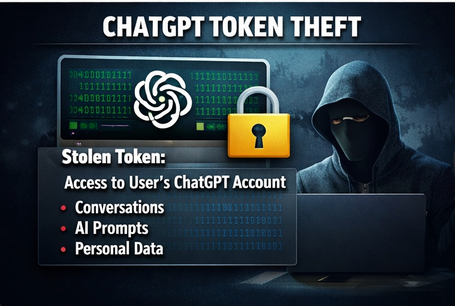
According to LayerX, a network of 16 extensions (mostly on Chrome Web Store and one on Microsoft Edge Add-ons) were built to intercept ChatGPT authentication tokens by injecting scripts into chatgpt[.]com.
While the campaign’s download volume was reportedly about 900 installs, the risk is serious because token theft can give attackers access similar to the real user.
Security researcher Natalie Zargarov warned that stolen tokens can allow account impersonation and may expose sensitive user data such as:
- conversation history
- metadata
- code snippets
- private AI prompts and content
With AI tools becoming more common in companies and personal workflows, attackers are now using trust in AI brands as a weapon — tricking users into installing extensions that look like productivity tools.
Browsers Are Now the New Endpoint
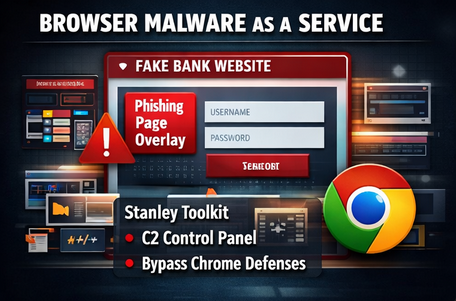
The report also connects these extension threats to the rise of browser-based cybercrime. Researchers pointed to a malware-as-a-service toolkit called Stanley, allegedly sold on Russian cybercrime forums for around $2,000 to $6,000.
This toolkit reportedly enables criminals to build Chrome extensions that can:
- display phishing pages in an iframe overlay
- keep the URL bar looking legitimate
- deliver spoofed redirects and fake notifications
- manage victims through a control panel
Some versions of the toolkit even claim the buyer can publish an extension that passes Chrome Web Store review.
Although the service reportedly disappeared around January 27, 2025, researchers warned such tools often return under new names.
Varonis researcher Daniel Kelley described it as a sign of the times: with remote work, SaaS adoption, and BYOD policies, the browser is effectively becoming the “new endpoint” attackers want to control.
What Users Should Do (Quick Safety Checklist)
To reduce the risk of malicious extension attacks, users should:
✅ Remove unnecessary extensions (especially shopping and AI helper tools)
✅ Check extension permissions (clipboard, browsing history, “read and change data on all websites”)
✅ Avoid unknown publishers, cloned branding, or vague descriptions
✅ Use endpoint security that monitors browser extension behavior
✅ Rotate passwords and sign out of ChatGPT if token theft is suspected
✅ Consider browser extension allowlisting in enterprise environments